A certain kind of office humor has always existed: the sticky note on the mouse sensor, the “accidental” calendar invite to “Mandatory Fun,” the harmless typo that turns a report title into a meme. Now that half of workplace life happens in chat, the prank impulse has moved there, too.
The problem is that chat carries weight. A screenshot can look like evidence, even when it is nothing more than a joke. And Microsoft Teams, with its clean layout and corporate familiarity, is especially easy to weaponize accidentally.
This guide is for teams that want the laugh without the mess: how to keep “fake Teams” fun, clearly fictional, and miles away from anything that could become an HR incident or a legal headache.
Why fake Teams screenshots are suddenly everywhere
It takes almost no skill to create a convincing chat image now. People use generators to mock up conversations for comedy sketches, onboarding slides, UX wireframes, and storyboards. Even a quick meme in a team channel often starts with, “What if the VP said this…”
Tools like this are built for speed: pick a platform skin, type messages, export an image. If you are looking specifically for a Microsoft look, a generator such as fake teams chat can produce a screenshot-style image in minutes. That convenience is exactly why it needs guardrails. The easier it is to fabricate, the more likely it is to be misunderstood.
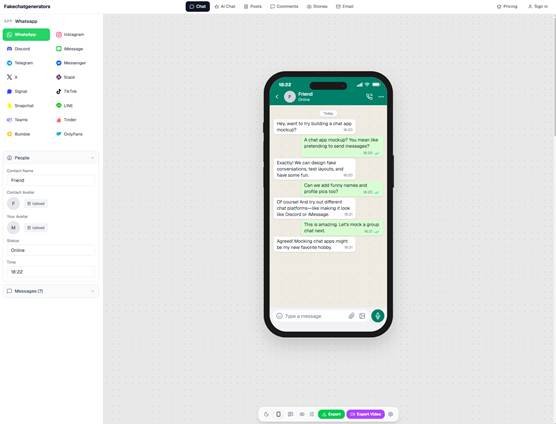
fakechatgenerators.com lets you mock up chat screenshots across 16 platforms
The bright line: pranks vs. falsification
A corporate-friendly prank is not “anything that gets a laugh.” It is something that is obviously playful, cannot reasonably harm someone’s reputation, and cannot be re-used as “proof” of something that did not happen.
A simple test: if the screenshot could plausibly be forwarded to a manager, client, journalist, or spouse and cause damage, do not make it. That includes fabricated messages about:
- Performance issues (“You’re on a PIP”)
- Layoffs, salary, promotions, equity
- Harassment, dating, or anything sexual
- Client confidentiality, deal terms, financial results
- Security incidents (“We got breached”)
- Political or religious commentary in someone else’s voice
The safest pranks create a chuckle and then evaporate. The dangerous ones persist.
A “safe prank” checklist for Teams-style fakery
If you want to use fake chats for internal fun, training, or a light-hearted team moment, build a habit of checking these boxes:
1) Make it clearly fictional at a glance
A viewer should not need a forensic analysis to spot the joke. Add obvious cues like:
- Over-the-top absurdity that no one would say at work (“Reminder: bring your dragon to standup”)
- A visible label in the image itself (“PARODY” or “MOCKUP”)
- A fake channel name that signals humor (#totally-real-announcements)
Avoid subtle jokes that look like real conflict or real instructions.
2) Never impersonate a real person without consent
Do not use a coworker’s name, photo, title, or writing quirks as the “voice” of the fake chat unless they explicitly agreed and you know they are comfortable with it. Even then, keep it gentle.
A safer pattern is to use clearly invented characters (“Pat Example,” “Taylor Testaccount”) or generic roles (“IT Bot,” “Space Intern”).
3) Keep it out of official flows
Do not drop prank images into places where real work happens: client channels, ticketing threads, compliance reviews, incident response chats, or executive updates. “It was a joke” is not a strong defense when the context is serious.
Create a designated space if your culture supports it, for example a #watercooler channel with an explicit pinned note about expectations.
4) Assume screenshots will travel
Even if you post a fake chat only to your immediate team, someone can forward it in two clicks. If the joke only works when it stays private, it is not office-safe.
5) Protect personal data and company details
No real phone numbers, email addresses, ticket IDs, customer names, addresses, internal project codenames, or anything that looks like a real log snippet. A parody should never accidentally become a data leak.
Better uses than pranks: training, onboarding, and UX
A lot of “fake chat” creation is not about humor at all. It is a practical way to teach and design.
- Security training: Show a fake Teams message that looks like a credential phishing attempt, then ask employees to identify the red flags.
- Manager onboarding: Illustrate what good feedback looks like (clear, calm, specific), without exposing real performance conversations.
- Product and UX: Storyboard a chatbot flow or internal tool workflow using chat-style screens, instead of building a full prototype.
- Customer support scripts: Mock up example conversations for tone and escalation practice.
These are the contexts where fake chat screenshots shine, because everyone understands they are examples, not evidence.
When fake becomes a problem: risk scenarios to watch
Even well-meaning employees can cross a line without realizing it. The following situations tend to create real fallout:
- The “authority voice” prank: A fake message that appears to come from a leader, HR, or legal. People act on it before it is debunked.
- The “gotcha” prank: A screenshot meant to embarrass someone, even if it is “just teasing.” Screenshots are durable shame artifacts.
- The “external share” mishap: A parody image gets posted on LinkedIn, TikTok, or a public Slack community. Now it is not internal humor, it is brand content, and the company did not consent.
- The “evidence” remix: Someone crops out the joke context and re-shares it as if it were real. You cannot control what happens after export.
If you manage a team, it is worth saying out loud: fabricated screenshots should never be used in a dispute, never used to pressure someone, and never used to simulate approval or instructions.
A simple policy that does not kill the fun
You do not need a 14-page document. A short, readable guideline often works better:
- Parody must be labeled in-image.
- No real names or photos without explicit consent.
- No topics involving pay, job status, harassment, or customers.
- Keep it to designated channels and internal audiences.
- If someone asks you to remove it, you remove it. No debate.
Add one more: repeated violations are a performance issue. Humor is optional. Respect is not.
Verifying images when the stakes are higher
Sometimes the situation is not a joke. A manager receives a screenshot alleging misconduct. A client forwards a “Teams message” that supposedly came from your staff. A journalist asks whether a leaked chat is authentic.
At that point, treat images the way you treat documents: as potentially tampered. Basic checks help (ask for the original message link, request context before and after, compare timestamps and UI details), but modern fabrication can be convincing.
This is where detection tools can support investigations. An ai image detector positions itself for high-volume, low-latency screening, and claims 98.7% detection accuracy across 50+ generative models with sub-150ms latency, alongside checks for NSFW content, violence, and document tampering. Used well, tools like that are not “gotcha machines.” They are part of a careful process: gather context, preserve evidence properly, and avoid rushing to conclusions.
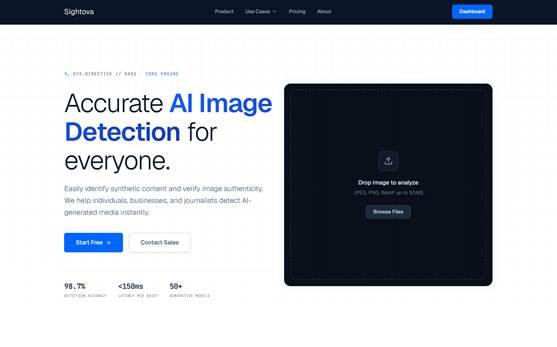
sightova.com flags AI-generated, tampered, NSFW, and violent imagery in milliseconds
A culture note: the best pranks punch up at stress, not at people
If your workplace is tense, fake screenshots can easily become a proxy for real frustration. The safest office humor targets shared annoyances (calendar overload, mysterious meeting names, printer errors) rather than individuals.
A good rule: the person “featured” in the joke should be laughing first, and still laughing a week later.
Used thoughtfully, Teams-style fakery can be a harmless bit of levity or a genuinely useful training aid. Used carelessly, it is a fast track to distrust. The difference is not the tool. It is the intent, the context, and the guardrails you choose before you hit export.